Everything from the KSeF invoice, and the transfer details without scrolling
Księguś now shows every field of the KSeF file, including the seller's title and notes. The invoice number and account number are one click to copy.
What changed
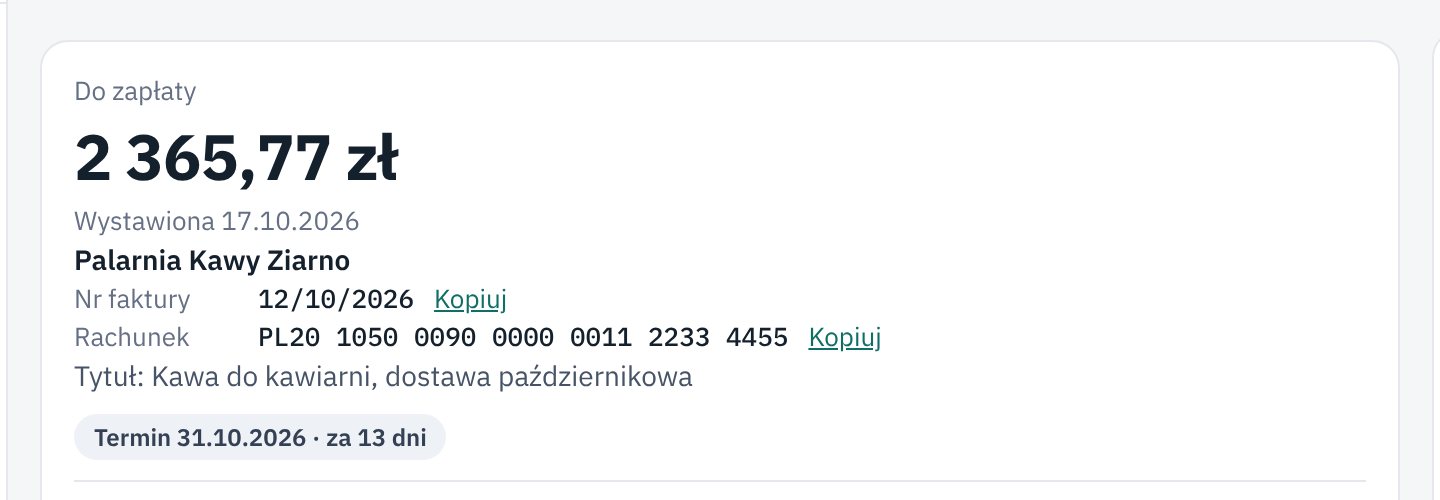
A KSeF invoice has no separate "title" field. Sellers put it in the additional description, in the footer or in the line names. Księguś now shows this information: the additional description, such as a title or an order number, right under the amount, and the invoice footer further down the page.
Fields that fit no usual box are listed under Other fields in the KSeF file. Lines priced gross now show their prices, just like on paper.
The top of the invoice has everything you need for a transfer: amount, issue date, vendor, Invoice no. and Account. The invoice number and account number have a Copy button, so you paste them into your bank without retyping.
Who it helps
- Anyone who pays invoices by hand in online banking.
- Companies whose suppliers put an order, contract or delivery note number on the invoice.
- Your accountant, who checks the invoice without opening the XML file.
How to try it
- Open Invoices and click any invoice from KSeF.
- See the amount, the seller's title and the account number at the top of the page.
- Click Copy next to the account number and paste it in your bank.