Each vendor in one place, together with the bank statement
One click takes you from the bank statement to the vendor. There you see their bank transactions and their status, and set a category for all their payments at once.
What changed
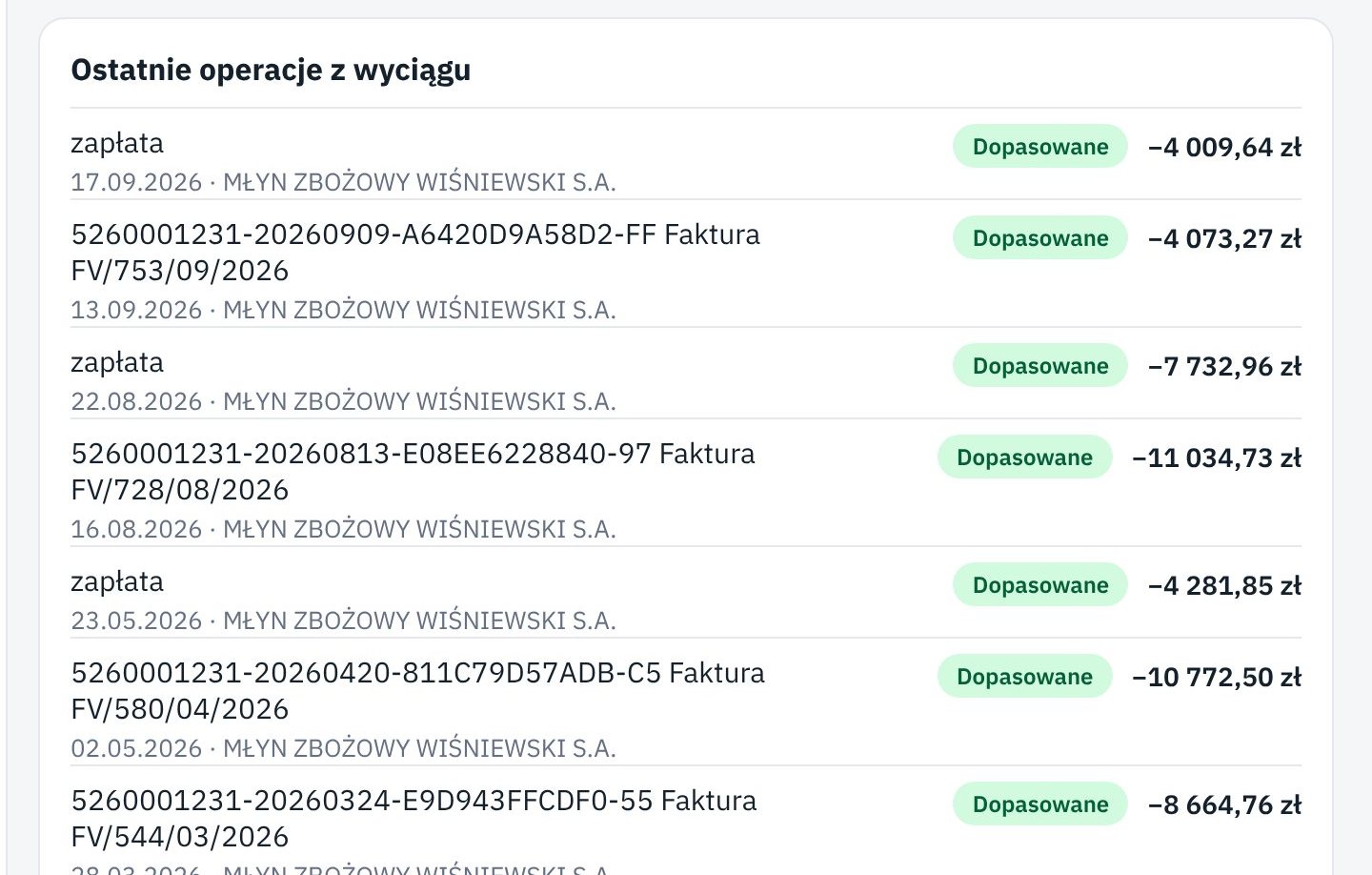
The vendor's name on the Bank statement now leads to their page. On the vendor page, under Recent bank statement entries, each transaction shows its status: matched to an invoice, to check, or unmatched. A click opens the transaction details.
When you set a category on the statement for a line of one vendor, Księguś asks whether to set it for their other lines too. One click sorts a whole year of payments, for example for fuel or rent. New lines from that vendor get the same category. A mistake is undone with Undo.
You can also leave a note on the vendor, such as "we always pay by the 10th" or "invoices come by e-mail", which your accountant can see.
Who it helps
- Companies that pay the same suppliers every month and want their spending in the right categories.
- Your accountant, who can quickly check that all of a vendor's payments have invoices.
- Anyone who wants the history with a vendor without digging through statements.
How to try it
- Open Bank statement and click the vendor's name next to any line.
- On their page, see Recent bank statement entries and their status.
- Go back to Bank statement, tick a line, pick a category, click Set category and accept the offer for the other lines.