Attachments on invoices and bank transactions
Credit notes, contracts and transfer confirmations now go where they belong: on the invoice or on the bank statement line. Your accountant sees them straight away.
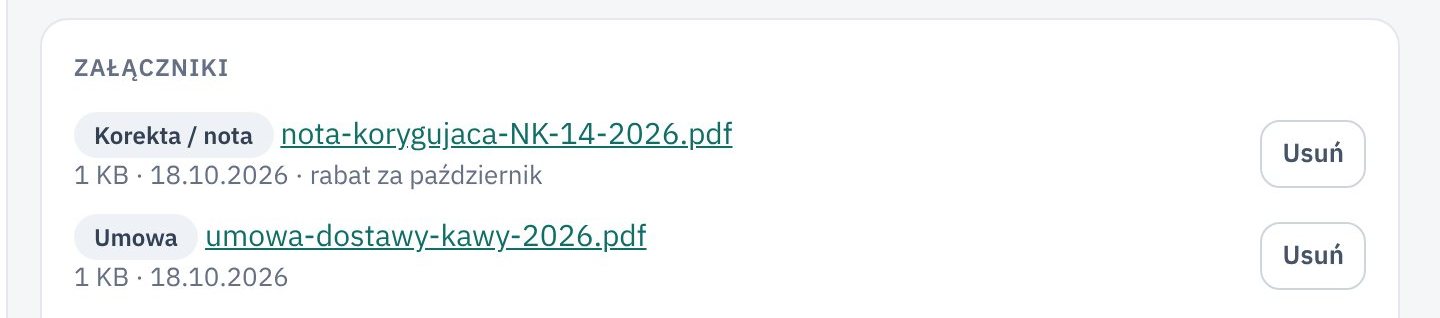
What changed
The invoice page and the Transaction details of a bank statement line have a new Attachments card. You add a PDF or a photo there and choose what it is: a correction or credit note, a contract, a confirmation or another document. You can add a short note.
Attachments show on both sides of a payment. The invoice shows the files of the transaction that paid it, and the transaction shows the files of the invoices it paid. On the Bank statement list, a paperclip marks the lines that have documents.
Who it helps
- Companies that get credit notes, contracts and confirmations by e-mail and then have to hunt for them.
- Your accountant, who opens the files right in the app and gets them with the invoices in the For the accountant export.
- Anyone who, a year from now, wants to know why they paid a different amount than the invoice said.
How to try it
- Open an invoice, or click Transaction details next to a line on the Bank statement.
- In the Attachments card, click Add attachment and choose a file.
- Pick the kind of document and save.
A file can be up to 20 MB. Deleting an attachment cannot be undone, so Księguś always asks first.